Stable Flow: Vital Layers for Training-Free Image Editing
Vital Layers for Image Editing
They are the first to do parallel generation for image editing using MM-DiT’s. They ablate layers to find the most important layers, patch over the image attention features from the source to the target prompt run, and also introduce a better latent inverse process to be able to edit real images.
project site: https://omriavrahami.com/stable-flow/
Section 3.1. Vital layers: They ablate each layer and then calculate the change in DINOv2 score compared to the original
- Layers with the biggest perceptual change are called vital layers. They actually got the same result as me where I qualitatively found that layer 18 is pretty important.
Section 3.2. Image editing: They then use these vital layers By generating the original and edited image in parallel, and patching over the image attention features (keys and values, this differs from the next work) of the edited version with the original, only in vital layers. 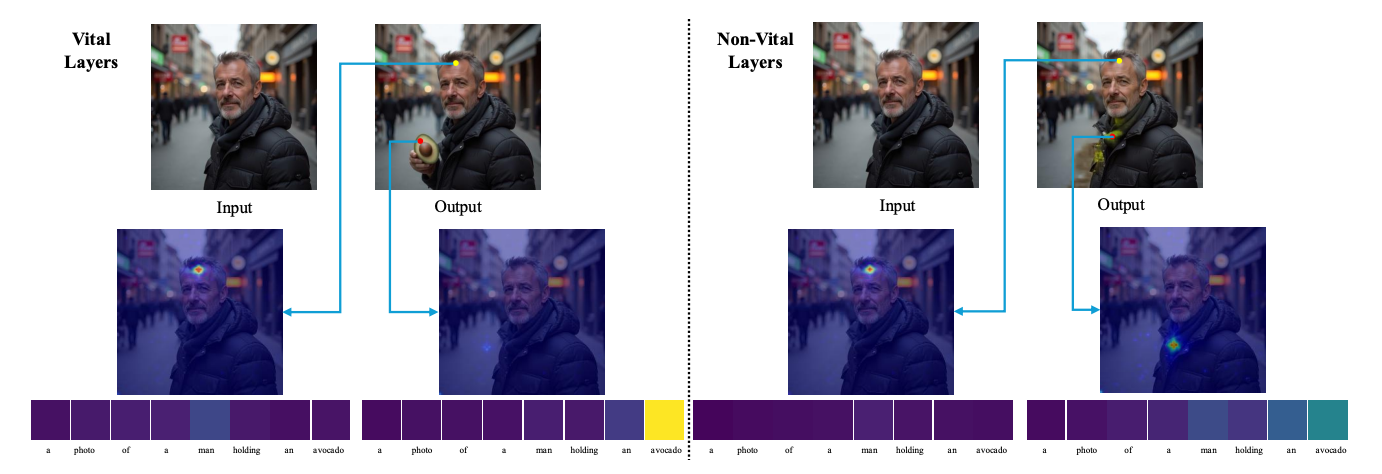
- Figure 6
- (Left) A cool demonstration that for a pixel in the original feature that was not supposed to change, In vital layers, with their new editing technique, it pays more (self)attention to the original image pixel, while pixels that are supposed to reflect the new edit pay attention to the text token.
- (Right) This is not the case in non-vital layers
Section 3.3. For editing real images, in order to get the underlying latent, instead of following the reverse process normally, they first multiply the image latent by 1.15, and then do the reverse process. Supposedly, this pushes the image to be more out-of-distribution or something.
Experiments
Data: COCO modified to have non-rigid editing tasks.
Metrics: CLIP similarity between edited image and initial image, Between edited image and prompt, and between the direction of the prompt change and the direction of the image change.
ablated using vital layers (i.e. used non-vital layers, or all layers)
Their method was unable to do style changes (one of the later works does this), Object dragging, and background replacement.