Unraveling MMDiT Blocks: Training-free Analysis and Enhancement of Text-conditioned Diffusion
scaling text embeddings for Image Editing
Layer ablations and re-scaling text embeddings pre-attention to figure out which layers are most relevant to specific properties like color, spatial relationships, and count. Then applying this rescaling of text embeddings to make generated and edited images more aligned with text prompts.
SD3.5-Large, FLUX.1-Dev, and Qwen Image
Data: 333 prompts generated by GPT 5 about color, amount, and spatial relationships metric:
- for color and spatial, question and answer by Qwen2.5-VL-72B
- for amount, CountGD
- Perceptual DINOv2 score and semantic CLIP score between the original and modified images
- (Repeat with 5 seeds)
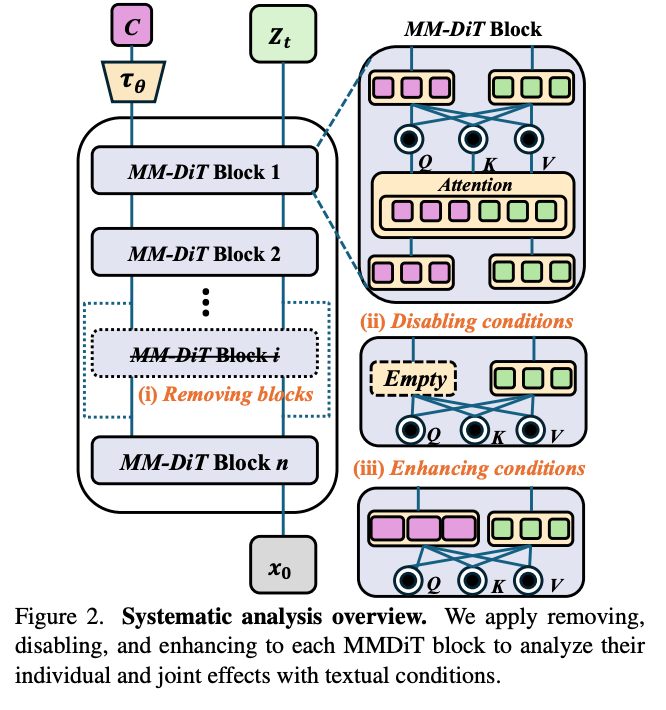
- Three methods of making observations about the effects of blocks
- 1. Ablating the entire block
- 2. Zeroing out the text condition tokens.
- 3. Doubling the text condition tokens
Observations:
- Middle blocks are not really critical. Earlier ones are.
- Zeroing out text conditioning is more disruptive, but still mostly for earlier layers.
- Doubling conditioning works well for earlier layers for Color and Spatial, and for later layers, for Count.
Applications:
3.2: Enhancing text alignment by just scaling up the conditioning vectors for the text tokens you’re interested in (mask provided in equation (5), whole sentence in equation (4))
3.3 Image editing following the stable flows paper except they add in their enhancing text tokens for critical layers
3.4 Accelerate inference by skipping non-critical layers.
Experiments:
datasets:
- T2I-CompBench++ and GenEval for text-to-image alignment
- 1000 source-target prompt pairs * 5 editing directions generated by GPT 5
- Aesthetics and HPSv2 to measure how aesthetically preferable the edited images are
- comparisons: TACA for text-to-image alignment, base Stable Flow for image editing
Results:
- They do quite convincingly better on text-image alignment. Qualitative looks good.
- For image editing, they need human evaluation data to be convincingly better than Stable Flow.
ablations:
- Scaling up for the text enhancement anywhere from 1.2 to 2.0 does ok.
- Randomly choosing layers instead of using their specific analysis does actually reasonably okay, it’s just a little bit worse.